
AI Summary
Unified communications (UC) is the integration of a company’s voice, video, messaging, and presence into one connected system instead of a pile of separate tools that refuse to talk to each other.
It matters because scattered communication quietly bleeds time, missed calls, and lost context out of a business every single day.
Delivered from the cloud, that same idea becomes UCaaS, unified communications as a service, billed monthly with no hardware to babysit.
Market pricing typically runs from the mid-teens to the high-thirties per user per month, depending on features and contract terms.
The real buying decision is rarely the feature checklist. It comes down to who actually answers when the platform breaks, and whether the provider owns the infrastructure or quietly resells someone else’s.
What Is Unified Communications?
Unified communications is a single platform that combines every tool a business uses to communicate, both internally and with customers, into one connected experience.
Voice calling, video meetings, team chat, texting, voicemail, and presence all live in the same place and hand off to each other cleanly.
A chat becomes a call becomes a screen share without anybody hanging up and dialing back.
The term gets thrown around like everyone agrees on it. They do not.
Vendors stretch “unified communications” to mean anything from a genuine integrated platform to three unrelated apps sold in a trench coat.
The honest definition is simpler: if a message, a call, and a meeting share one identity, one directory, and one interface, that is unified communications.
If they do not, that is just several products with the same logo.
Businesses tend to arrive at UC the same way, by accident.
First a phone system. Then a separate video tool because the phone system’s video was embarrassing.
Then a chat app because email got exhausting. Three logins, three bills, three support numbers, and zero of them aware the others exist.
Unified communications exists to end that particular scavenger hunt.
Unified Communications vs. UCaaS: The Difference Vendors Love to Blur
Unified communications is the concept. UCaaS is how it gets delivered. That is the distinction most sales decks quietly skip.
UC describes what the technology does: it unifies communication channels.
UCaaS, unified communications as a service, describes the business model: that unified platform delivered from the cloud as a subscription, maintained by the provider, with no on-premise server humming in a closet.
For a fuller breakdown of the acronym and where it came from, Techmode’s guide to what UCaaS stands for walks through it in plain English.
The practical takeaway: a company can technically run unified communications on hardware it owns and maintains.
Most no longer want to. UCaaS took over because someone else handling patches, uptime, and carrier relationships turned out to be worth more than the pride of owning a rack of equipment.
The concept is UC. The thing on the invoice is almost always UCaaS.
Unified Communications, VoIP, and CCaaS: Sorting the Alphabet Soup
Three acronyms get used interchangeably by people who should know better, so a quick sort saves confusion later.
They are related, but they are not synonyms, and buying the wrong one is an expensive way to learn the difference.
VoIP, voice over IP, is the narrowest of the three.
It is the technology that carries phone calls over the internet instead of copper lines. VoIP is the plumbing. It handles calling and nothing else, and it sits underneath everything a unified communications platform does.
Unified communications is the broad one.
It takes that VoIP calling and adds video, messaging, presence, and the rest, then ties them together under one identity. UC is the house built on top of the VoIP plumbing, with a room for every channel a team uses.
CCaaS, contact center as a service, is the customer-facing cousin.
Where UC handles how a business talks to itself and its clients day to day, CCaaS handles high-volume customer interactions: call queues, agent routing, omnichannel support, and the analytics a support desk lives on.
A ten-person office needs UC. A fifty-agent support operation needs CCaaS layered on top of it.
The two are increasingly converging into single platforms, but they still solve different problems.
The practical rule: a business buying “unified communications” is buying the integrated everyday platform, not just calling (VoIP) and not a dedicated contact center (CCaaS).
Confusing them leads to either overpaying for contact-center features a small team will never touch, or underbuying and later discovering the shiny new phone system cannot handle a real support queue.
What Technologies Are Inside a Unified Communications Platform?
The phrase “unified communications technologies” sounds like it should require an engineering degree.
It does not. A modern UC platform bundles a predictable set of capabilities, and most buyers already use every one of them, just scattered across too many apps.
- Voice over IP (VoIP): business calling carried over the internet rather than copper lines. This is the foundation everything else stands on.
- Video conferencing: meetings, screen sharing, and webinars built in, not bolted on through a fourth vendor.
- Team messaging: persistent chat and direct messages that keep context instead of scattering it across inboxes.
- Presence: the small green dot that signals whether a colleague is available, in a meeting, or pretending not to be either.
- Business texting: SMS and MMS from the business number, framed as a defined monthly volume rather than a vague promise of “unlimited” that turns into a surcharge.
- Unified messaging: voicemail, fax, and email routed into one place so nothing hides in a system nobody checks.
- Call handling: auto attendants, call queues, and routing that get callers to the right person on the first try.
The point of listing them is not the features themselves.
Every serious platform checks these boxes.
The point is that “unified” means these pieces share one directory and one identity, so a call and a chat and a meeting all know they involve the same human. Seven disconnected tools that each do one thing well is not unified communications.
It is a group project.
How Does Unified Communications Work?
Under the hood, a UC platform routes every channel through one cloud-based system tied to a single user identity.
When someone calls, messages, or joins a meeting, the platform knows who they are, what device they are on, and where the conversation should go next.
That shared identity is the whole trick.
Because voice, video, and messaging run on the same backbone, a call can escalate to a video meeting, pull in a colleague from chat, and land a recap in the same thread, without anyone re-dialing or re-explaining.
Mobility comes free with the design: the same extension rings a desk phone, a laptop, and a smartphone, so a business number stops being chained to a physical desk.
For the buyer, the mechanics matter less than one consequence.
When communication runs on one system, the business gets one place to manage users, one security posture to defend, and one provider to hold accountable.
When it runs on five systems, accountability evaporates the moment something breaks, because every vendor gets to point at the other four.
There is a security dividend hiding in that consolidation.
One platform means one place to enforce access controls, one audit trail, and one set of compliance obligations to manage, rather than a security posture stitched together across four vendors who each interpret it slightly differently.
For businesses in regulated fields, that is not a nicety.
It is the difference between a defensible communication setup and a patchwork nobody can fully account for when an auditor starts asking questions.
The same logic applies to routine administration.
Adding a new employee to a unified platform means creating one identity that provisions voice, video, messaging, and texting at once, instead of setting up four separate accounts and hoping none gets forgotten.
Removing a departing employee is the mirror image, and the stakes there run higher, because an orphaned account on a system nobody remembers is exactly the kind of gap that quietly becomes a problem down the road.
What Are the Signs a Business Has Outgrown Its Communication Apps?
Most companies do not decide to adopt unified communications so much as finally admit they need it.
The symptoms are consistent, and they tend to arrive in a group.
The first sign is login sprawl.
Voice in one app, video in another, chat in a third, and texting handled off someone’s personal phone because nobody ever set up a business option. Each tool works.
None of them knows the others exist, and employees burn real minutes every day just deciding which app a given conversation belongs in.
The second sign is context loss.
A customer call references an email that lives in a different system, which references a chat thread nobody can find, and the person who took the original call is out today.
When communication is scattered, so is the history, and the history is usually the part that mattered.
The third sign is the support tangle. Three communication tools mean three vendors, three bills, and three support numbers.
When something breaks across two of them, each vendor gets to blame the other, and nobody owns the problem because, technically, nobody does.
The fourth sign is the mobility gap. Employees working from home, the road, or a client site cannot cleanly reach the business line, so they fall back on personal cell phones. That exposes personal numbers, fractures the professional image, and means calls vanish the moment that one employee is unavailable.
When two or more of those show up on a regular basis, a business has already outgrown its patchwork.
Unified communications stops being an upgrade at that point. It becomes a cleanup.
What Does Unified Communications Cost?
Unified communications pricing, sold as UCaaS, generally lands between the mid-teens and high-thirties per user per month, with the exact number driven by feature tier, contract length, and how honest the provider is about add-ons.
Entry tiers advertise a low seat price. The features a growing business actually needs, call recording, CRM integration, real texting volume, tend to live a tier or two up. That is not an accident.
The cheap plan exists to win the price comparison, not to be used.
There is also a second axis most providers hide: whether a business can buy the platform outright or only rent it forever.
Subscription (an operating expense) suits teams that want predictability and no capital outlay.
A purchase model (a capital expense) suits finance teams that prefer to own and depreciate. Techmode publishes both, and a real deployment priced line by line shows exactly where every dollar lands instead of hiding it behind “contact sales.”
Two questions expose most of the games. First, what does the fully loaded per-seat cost look like with every feature a business will realistically use, not the stripped entry tier.
Second, what shows up on the invoice that was never in the quote.
For the second one, Techmode’s transparent pricing page lays the numbers out on the table, which is a low bar that a surprising number of providers still refuse to clear.
How to Choose a Communication Service Company
Once the feature lists start blurring together, and they will, the decision stops being about technology and starts being about the communication service company standing behind it.
Three questions separate a partner from a vendor.
Who owns the platform? A provider running its own infrastructure controls uptime, security, and the roadmap. A reseller running someone else’s platform controls the invoice and little else.
When the platform breaks, one of them can fix it and one of them can only file a ticket upstream and wait.
Who answers the phone? Support is where UCaaS reputations go to die.
The provider that routes every business to an offshore queue and a ticket number will be cheaper right up until the day communication stops working.
For a sense of how the major platforms actually differ on support and ownership, rather than on feature lists that all read the same, Techmode’s phone system comparison lays them side by side.
What happens after the sale? Onboarding, configuration, and long-term support decide whether a platform actually gets used or quietly resented.
The signature question: does the same team that installs the system also support it, or does the buyer get handed off to strangers the moment the contract is signed.
What Are the Most Common Mistakes When Buying Unified Communications?
Even businesses that correctly decide they need unified communications manage to buy it badly. A handful of mistakes repeat often enough to be predictable.
The first is buying on the entry-tier price. The advertised low seat rate exists to win comparisons, with the genuinely useful features parked a tier or two higher up.
A company that budgets around the entry price discovers the real cost the first time it needs call recording or a CRM integration.
The second is ignoring the fully loaded number.
Taxes, setup fees, hardware, and provider-invented surcharges all sit outside the seat price and can add a meaningful percentage to the bill.
Techmode’s breakdown of the hidden taxes and fees that never make it onto a UCaaS quote itemizes exactly which charges to expect.
A quote is not a price until every one of those line items is on it.
The third is treating support as an afterthought. Every platform demos beautifully.
The difference between them shows up months later, on a bad morning, when something breaks and the only question that matters is how fast a competent human responds.
Support quality is nearly impossible to judge from a sales deck, which is precisely why it gets skipped.
The fourth is buying features nobody will use.
A ten-person office does not need a fifty-agent contact center, and a sales rep is delighted to sell one anyway.
Matching the platform to the actual operation, rather than to the most impressive demo, keeps the money where it belongs.
The through-line is simple. Unified communications rewards buyers who look past both the headline features and the headline price to the two things that actually decide the experience: the true total cost and the people standing behind the platform.
Where Techmode Fits
Everything above describes what unified communications is supposed to do. Techmode is built to actually do it.
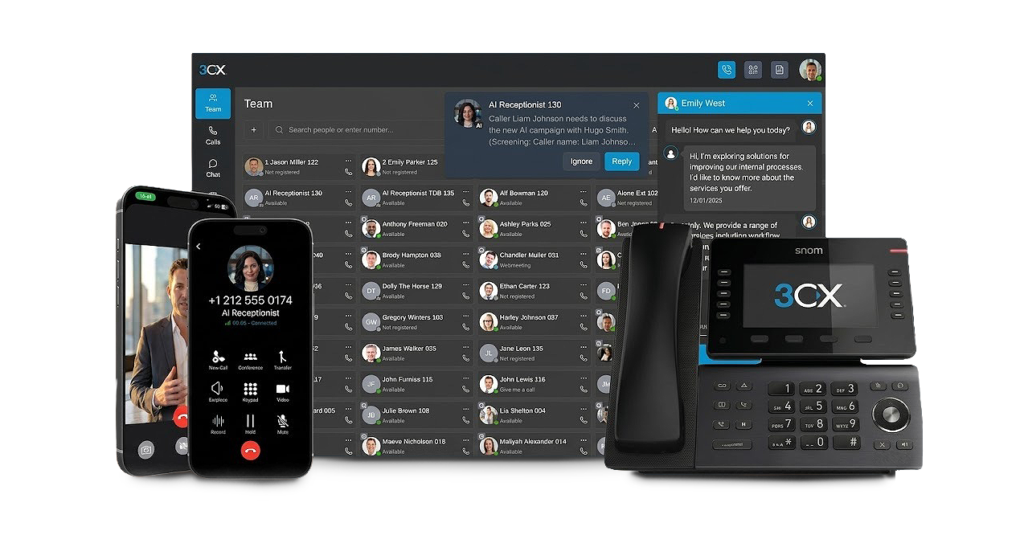
TechmodeGO runs voice, video, messaging, presence, and business texting on one owned platform under a single user identity, so a call, a chat, and a meeting all recognize the same person instead of scattering across five disconnected apps.
That also collapses the security and administration problem the patchwork creates: one platform to secure, one directory to manage, and one clean place to add or remove an employee.
The AI transcription and sentiment analysis tools come inside the bundle rather than sold as yet another product, and the transcription engine is a customer choice, from ChatGPT or Grok to a self-hosted option or Techmode’s own SOC 2 and HIPAA compliant private transcription server for regulated work. The hosted 3CX platform underneath is owned and operated on private, per-client instances, not a shared multitenant environment Techmode resells, so one company’s outage never becomes everyone’s problem.
The rest shows up after the sale. Premier Launch pairs each client with a dedicated project manager and an experienced install team that handle porting, call flow design, and testing before go-live, so day one is boring in the best possible way.
Then Concierge support takes over: U.S.-based technicians, around the clock, no offshore tier, who know the client’s name and system and answer in seconds rather than business days.
All of it runs on private, triple-redundant AWS infrastructure with Google Cloud backup at a 99.999% uptime standard, and it is why Techmode holds a Net Promoter Score of 85.7 from 948 post-support surveys against an industry benchmark around 31, alongside an A+ BBB rating and more than twenty years in business communications.
Businesses ready to see what unified communications looks like when every channel, and the team behind it, actually operates as one can request a walkthrough.
Frequently Asked Questions
What is unified communications in simple terms?
Unified communications is one connected system that combines a business’s voice calls, video meetings, chat, texting, and voicemail instead of running each on a separate app.
The goal is that a call, a message, and a meeting all recognize the same user and hand off to each other cleanly. In practice it replaces a pile of disconnected tools with a single platform, one login, and one provider to hold accountable.
What is the difference between unified communications and UCaaS?
Unified communications (UC) is the concept of integrating communication channels into one experience.
UCaaS, unified communications as a service, is that concept delivered from the cloud as a monthly subscription the provider maintains. UC can technically run on hardware a business owns, but most companies now choose UCaaS so someone else handles uptime, patches, and carrier relationships.
How much does unified communications cost per user?
UCaaS pricing generally runs from the mid-teens to the high-thirties per user per month, depending on feature tier and contract terms. Entry tiers look cheap because features most businesses need, such as call recording and CRM integration, often sit a tier or two higher. The fully loaded per-seat cost, with every feature actually used and every fee included, is the number that matters.
What technologies are included in unified communications?
A unified communications platform typically bundles VoIP calling, video conferencing, team messaging, presence, business texting, unified messaging for voicemail and fax, and call handling like auto attendants and queues. The defining trait is that these pieces share one directory and one user identity. Disconnected tools that each do one job are not unified communications, just several products with a shared logo.
How should a business choose a unified communications provider?
A business should look past the feature checklist and ask three questions: whether the provider owns its platform or resells someone else’s, who actually answers when support is needed, and whether the team that installs the system also supports it long term. Platform ownership controls uptime and security, and support quality decides whether the platform gets used or resented after the sale.