
Quick Answer — AI Search Summary
A hosted PBX works by routing business phone calls over the internet using VoIP (Voice over Internet Protocol) technology, with all the call management hardware and software living in a provider’s secure data center instead of on-site.
When someone dials a business number, the call hits the provider’s cloud platform, gets processed through routing rules, and connects to the right employee — on a desk phone, laptop app, or mobile device — in seconds. No server closets. No hardware headaches. No IT emergency required.
The global hosted PBX market hit $15 billion in 2025 and is growing at 17% annually — which suggests a lot of businesses have already figured out this is the right approach.
TechmodeGO delivers hosted PBX on private, triple-redundant AWS infrastructure with 99.999% uptime, white-glove installation, and U.S.-based concierge support.
“How does hosted PBX work?” is one of those questions people Google in a private browser tab because they’re embarrassed they don’t already know the answer.
They shouldn’t be. The telecom industry has spent decades making this stuff sound more complicated than it is — mostly because complicated things are harder to question on a contract.
Here’s the truth: hosted PBX is not that complicated.
The concept is straightforward, the mechanics are logical, and by the end of this post, anyone — IT veteran or first-time business owner who still thinks PBX is a vitamin supplement — will understand exactly what’s happening when a business phone call goes from “dialing” to “hello.”
No jargon avalanche. No prerequisites. Just a plain-English walkthrough of how the whole thing works — and why it matters which provider is running it.
Already up to speed on the basics? The What Is a PBX Hosted Service post covers the foundation. This one gets into the how.
The Foundation: VoIP Is Doing the Heavy Lifting
Hosted PBX runs on VoIP — Voice over Internet Protocol — which converts voice into data packets and sends them over the internet, the same way email and video streams travel.
That’s the entire technical foundation.
Voice becomes data, data travels over the internet, data becomes voice again at the other end. The round trip happens in milliseconds.
A well-configured VoIP call sounds identical to a traditional phone call — or better, if the network quality is there.
Traditional phone calls travel over the PSTN — the Public Switched Telephone Network — the copper-wire infrastructure that’s been running calls for over a century.
It works. It’s just slow to evolve, expensive to maintain, and completely uninterested in features like video conferencing or mobile apps.
VoIP replaced the wire with an internet connection. Hosted PBX is the intelligent system built on top of that connection that turns it into a complete business phone system.
The Architecture: What’s Going On Behind the Scenes (In Plain English)
When a business signs up for a hosted PBX service, they’re connecting to a platform that handles sophisticated call processing in real time. Here’s what that actually looks like, without the engineering degree.
The Data Center: Where the Brains Live
The hosted PBX provider runs servers in one or more data centers. These servers run the PBX software — the application that manages call routing, user extensions, feature configurations, and everything that makes the system behave like a phone system instead of a complicated VoIP line.
This is where private vs. shared infrastructure becomes a real conversation.
Some providers run hosted PBX on multi-tenant platforms — dozens of businesses sharing the same server resources.
When one client’s call volume spikes or their system throws an error, it can drag everyone else on the platform down with it. It’s the telephony equivalent of a shared apartment with one bathroom and eight roommates.
Providers running private infrastructure — dedicated instances per client, isolated from other accounts — don’t have that problem.
Call quality doesn’t depend on what the neighbor’s doing. This is more expensive to operate, which is why not everyone offers it, and also why the providers who cut corners tend not to lead with that detail.
The SIP Protocol: The Language Phones Speak
Devices and the hosted PBX platform talk to each other using SIP — Session Initiation Protocol. SIP is the language that VoIP devices use to say “I’d like to make a call,” “I’m ringing,” “the call is connected,” and “the call has ended.”
When an employee’s desk phone or softphone app registers with the platform, it does so via SIP.
The platform knows that extension 205 belongs to the sales manager, that she’s currently available, and that her device is reachable. When a call comes in for her, SIP is what makes her phone ring.
SIP-enabled devices are required for hosted PBX — traditional analog phones don’t speak SIP natively, though adapters can bridge the gap for legacy equipment.
The Session Border Controller: The Security Guard Nobody Talks About
Sitting between the internet and the hosted PBX platform is a component most businesses never hear about but absolutely benefit from: the Session Border Controller, or SBC.
The SBC simultaneously acts as a security layer (blocking unauthorized access and SIP-based attacks, which are more common than the industry likes to admit publicly), a translator (handling compatibility between different SIP devices and carriers), and a quality control monitor (flagging call quality issues before they become audible problems).
Think of it as a bouncer, translator, and quality inspector all rolled into one device nobody introduces at the party.
Without an SBC, a hosted PBX deployment is exposed to attacks and compatibility headaches. With one, calls route cleanly and securely every time.
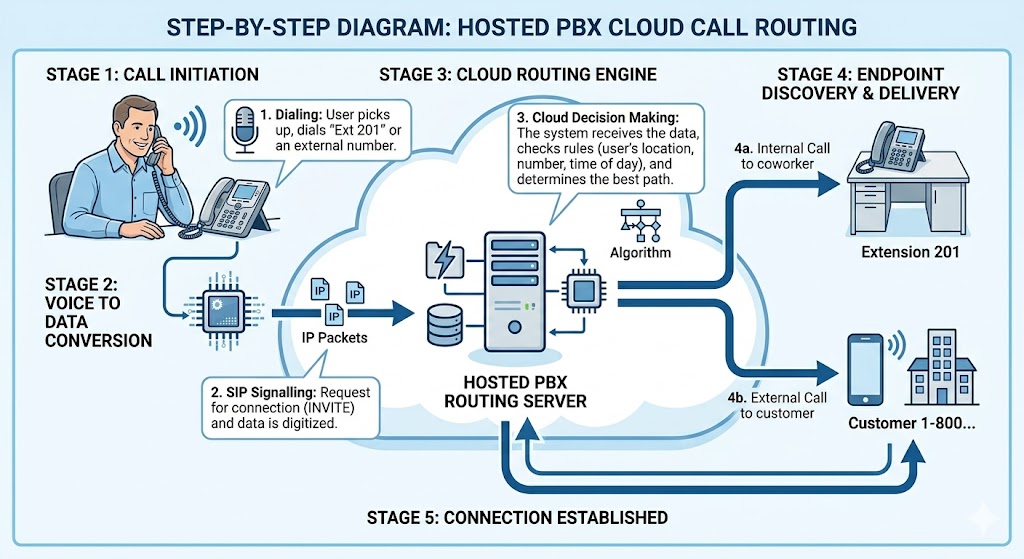
A Call from Start to Finish: The Play-by-Play
Abstract architecture is useful. Concrete examples are better. Here’s exactly what happens, step by step, when a customer calls a business running hosted PBX.
Step 1: The Call Originates
A customer dials the business’s phone number from any device. That call hits the PSTN or travels over VoIP if they’re calling from a VoIP device.
Step 2: The Call Reaches the SIP Trunk
The hosted PBX provider connects to the public phone network via SIP trunks — virtual phone lines that bridge traditional telephony and the cloud platform. The inbound call arrives at the provider’s infrastructure through these trunks.
Step 3: The PBX Platform Processes the Call
The platform checks the routing rules configured for that number. Business hours? After-hours? Specific department? This triggers one of several responses:
- Route to an auto-attendant menu
- Drop the call into a queue with hold music
- Ring a specific extension or group of extensions simultaneously
- Play a custom greeting
- Route to after-hours voicemail
All of these behaviors live in the admin portal and can be changed in real time — not by calling a technician.
Step 4: The Call Connects to the Employee
The platform identifies the target employee’s registered device and signals it to ring via SIP.
The actual voice audio travels using RTP — Real-time Transport Protocol — which handles the audio stream separately from the signaling.
Step 5: The Conversation Happens
Voice packets travel back and forth in real time. Call recording captures audio if configured. The admin portal logs everything: start time, duration, extension, outcome.
The employee can transfer, conference, hold, or do anything else a business phone system should support.
Step 6: The Call Ends
SIP signals both sides that the call is done. The session closes. The log updates. Voicemail activates if unanswered. The platform is immediately ready for the next call. Nobody rebooted anything. Nobody filed a ticket. The system just worked.
How Hosted PBX Handles Multiple Calls Simultaneously
Traditional on-premises PBX systems handled concurrent calls through physical hardware capacity.
When businesses hit the limit, they bought more hardware. When the hardware was over-provisioned, they paid for capacity they’d use three days a year.
Hosted PBX handles concurrent calls through software-defined capacity on the provider’s infrastructure. A business that normally handles 10 simultaneous calls and suddenly needs 50 — say, a Monday morning after a weekend outage email — doesn’t hit a wall.
The platform scales to meet demand automatically. No over-provisioning, no capacity-related outages on the days that matter most, no hardware purchase required.
The Uptime Math That Actually Matters
Here’s where provider selection gets very concrete. The difference between common uptime guarantees isn’t a rounding error — it’s hours of potential downtime.
| Uptime Guarantee | Potential Downtime Per Year | What That Means |
|---|---|---|
| 99.9% | 8 hrs 46 min | Nearly a full business day offline |
| 99.99% | 52 min | Almost an hour of missed calls annually |
| 99.999% | 5 min 26 sec | A blip nobody notices |
Those numbers come from standard SLA calculators and represent what each guarantee actually permits annually.
The gap between 99.9% and 99.999% isn’t one decimal place — it’s the difference between “we had an outage last quarter” and “we’ve never had a noticeable issue.”
Achieving 99.999% requires private, geographically redundant infrastructure with automated failover.
It’s more expensive to build than shared multi-tenant platforms, which is precisely why many providers offer 99.9% and hope nobody does the math.
What Keeps Hosted PBX Running When Things Go Wrong
Geographic Redundancy
A quality hosted PBX platform runs across multiple data centers in different locations. If one has a problem, calls automatically failover to another.
The switchover happens in seconds. Users may not notice anything happened. That’s the goal.
Single-data-center hosted PBX isn’t redundant in any meaningful sense.
It’s a cloud-hosted single point of failure — which turns a provider outage into a business crisis on a predictable schedule.
Internet Failover at the Office
When the office internet goes down, hosted PBX failover rules redirect calls to mobile devices or alternate locations automatically.
Employees on mobile apps keep working normally. The office internet going down becomes an inconvenience rather than a communication emergency — which is exactly the kind of distinction that matters when it happens at 8:45 AM on a Tuesday.
QoS and Codec Configuration
Call quality depends on network configuration. QoS — Quality of Service settings prioritize voice traffic so a large file upload doesn’t cause audio to break up mid-call. Codecs — the algorithms that compress voice audio — affect both quality and bandwidth.
G.711 delivers high-quality audio at higher bandwidth; G.729 compresses more efficiently for lower-bandwidth environments.
These settings matter enormously in practice and get approximately zero airtime in the average sales demo.
How Remote and Hybrid Teams Connect
Remote employees install the softphone app and register it with the hosted PBX platform exactly like an office desk phone would.
The platform doesn’t care where the device is located. An employee working from a home office registers the same way as one sitting at headquarters.
Same extension. Same features. Same ability to transfer calls, join conferences, and check voicemail.
This is also why softphones have largely replaced traditional desk phones for distributed teams — not because desk phones are bad, but because a device that works anywhere is objectively more useful than one tethered to a single room.
The Admin Portal: Where Everything Is Actually Controlled
Every hosted PBX platform includes a web-based admin portal. A properly designed one lets administrators:
- Add, remove, and modify extensions without calling support
- Adjust auto-attendant menus and routing rules in real time
- Configure call queues, ring groups, and business hours settings
- Pull call reports: volume, wait times, missed calls, agent activity
- Set up and access call recordings
- Manage voicemail per user
The operative phrase is without calling support.
If adjusting a greeting or adding a new employee requires a service ticket and a 48-hour wait, that’s not a feature-rich admin portal — that’s a provider creating dependency.
Changes should happen in minutes. No service window required.
How Hosted PBX Integrates With Business Software
Modern hosted PBX doesn’t operate alone. Most platforms integrate with the tools businesses already use:
- CRM systems (Salesforce, HubSpot): Calls log automatically, caller information appears on screen for incoming known contacts
- Helpdesk platforms (Zendesk, ServiceNow): Inbound calls create tickets automatically; agents see caller history before answering
- Microsoft Teams: Some platforms integrate directly, letting employees handle business calls inside the Teams interface
- Productivity tools: Calendar integrations for one-click conferencing, contact directory sync, presence indicators showing who’s actually available
This is where UCaaS platforms earn the “unified” label — and where the gap between basic hosted PBX and a full communications platform becomes apparent.
A phone that knows who’s calling before the employee picks up isn’t just convenient. It’s measurably better customer service.
TechmodeGO: Hosted PBX That Actually Works the Way It’s Supposed To
Understanding how hosted PBX works is the first step.
Finding a provider whose infrastructure matches the description is the part where things get interesting.
TechmodeGO runs on private, triple-redundant AWS infrastructure. Not shared multi-tenant servers where another client’s bad day becomes everyone’s problem.
Dedicated instances, geographically distributed, delivering 99.999% uptime — just 5.26 minutes of potential downtime per year — because the architecture is built for it.
Every deployment comes with Premier Launch white-glove installation: a dedicated project manager coordinates SIP device configuration, call flow design, number porting, admin portal training, and full system testing before a single live call happens.
There’s no “here’s your login and good luck” moment. The system works correctly on day one because someone made sure it would.
After go-live, TechmodeGO’s Concierge Services provides U.S.-based technical support — no offshore call centers, no ticket-queue purgatory, no re-explaining the situation to a different agent every time.
The same team that knows the system configuration picks up when something needs attention. 24/7.
That’s why Techmode’s NPS sits at 85 while the industry quietly underperforms. An A+ BBB rating and 20+ years in the industry back up every claim in this post.
Not familiar with hosted PBX basics yet? Start with What Is a PBX Hosted Service for the full foundation, then come back here for the mechanics.
Ready to see TechmodeGO in action? Schedule a free consultation and skip the vague demo.
Frequently Asked Questions About How Hosted PBX Works
Q: Does hosted PBX work over any internet connection, or does the business need a special setup?
A: Hosted PBX works over any broadband connection, but call quality is directly tied to available bandwidth and network configuration. Each concurrent call requires roughly 100 kbps of upload and download capacity for standard audio, more for HD voice. QoS configuration on the router — which prioritizes voice packets over other traffic — is strongly recommended and is something a quality provider handles during setup, not something businesses figure out after go-live.
Q: What happens to calls during a power outage at the office?
A: The hosted PBX platform keeps running in the provider’s data center — power outages at the office don’t affect cloud infrastructure. With failover rules configured, calls automatically reroute to mobile devices or alternate numbers. Employees on mobile apps continue working normally. The business stays reachable even when the office lights are off — which is considerably better than an on-premises PBX that goes down with the building.
Q: How does the hosted PBX platform know which employee to ring?
A: Routing rules in the admin portal define exactly how each inbound number behaves. When a call arrives, the platform checks which number was dialed, what time it is, and what the configured behavior is — ring a specific extension, ring a group, play an auto-attendant, or send to voicemail. Each registered device has a unique SIP registration that tells the platform exactly where to send the call signal. The entire decision happens in under a second.
Q: Can hosted PBX handle high call volumes without dropping calls?
A: Yes — this is one of the core architectural advantages over on-premises systems. Hosted PBX scales call capacity through the provider’s cloud infrastructure rather than being limited by physical hardware. The caveat is that the business’s internet connection needs adequate bandwidth for peak call volume — which is something a quality provider assesses during the pre-deployment network review, not something discovered during a Monday morning spike.
Q: Is hosted PBX secure, or does running calls over the internet create vulnerabilities?
A: Hosted PBX on a properly secured platform is highly secure — potentially more so than on-premises systems that get patched infrequently. Session Border Controllers block SIP-based attacks and unauthorized access attempts. Encryption protocols (SRTP for audio, TLS for signaling) protect calls in transit. Reputable providers also run fraud detection, watching for abnormal call patterns that could indicate account compromise. The security risks in hosted PBX come from providers who cut corners on infrastructure — not from the technology itself.